
Want to choose the right AI tools without wasting time? There are thousands of AI tools, and every one promises to save you time. The problem is that most people pick the tool first and the task second, then wonder why it never sticks. This guide gives you a simple three-step method to match an AI tool to what you actually need, plus top picks for students, office workers, and everyday use.
Your need
What you want to get done.
The AI tool
What helps you get it done.
The Nielsen Norman Group (NN/G) makes this clear: pressure to use AI doesn’t mean a tool actually helps, so test one tool against one real task before you decide. If AI is brand new to you, start with our beginner’s guide on How AI Tools Work, then come back here.
Why Choosing the Wrong AI Tool Costs More Than You Think

A bad pick wastes more than a subscription fee. You also spend time on setup, learning, moving files around, and fixing mistakes. A marketing consultancy, The Viable Edge, points out that the license price is usually the smallest part of what a tool really costs once training and maintenance are counted.
There is a security risk as well. Research cited by NN/G suggests that roughly 80% of employees admit to using unapproved AI tools at work. Widespread use doesn’t mean safe use. That is why a deliberate selection process matters. The three steps below give you one.
Step 1: Define Your Real Need Before You Look at Any Tool

Finish this sentence: “I want to ___ so that I can ___.” Pick something you do often, because small time savings add up when a task repeats. NN/G’s advice is to start with the task, not the tool, and the consultancy yorCMO adds two useful questions: who will actually use it, and who else needs a say?
Good examples: “write weekly client emails faster,” “turn my lecture notes into quiz questions,” or “find sources for a report.” If you can’t finish the sentence yet, you’re not ready to shop.
Step 2: Score Tools on the Six Criteria That Matter
Purdue University’s AI evaluation guide lists more than a dozen factors, including accuracy, bias, privacy, cost, ease of use, and integration. Most people can boil that down to six questions. Give each tool a score from 1 to 5 on each one.
| Criterion | What to check | Why it matters |
|---|---|---|
| Fit for your task | Does it do the exact job you wrote in Step 1? | A flashy tool is useless if it solves the wrong problem |
| Accuracy | Can you verify its answers elsewhere? | AI can sound sure and still be wrong |
| Privacy | What happens to the data you type in? | Some tools may use chats to improve their systems |
| Total cost | Free limits, paid plans, and your time | The cheapest sticker price is not always the cheapest tool |
| Ease of use | Can you get a good result in minutes? | Tools you find annoying are tools you stop using |
| Fits your setup | Does it work with the apps you already use? | Extra copy-and-paste steps add up fast |
Resist the urge to pick the tool with the longest feature list. The Viable Edge warns that choosing on features instead of outcomes is one of the most common selection mistakes.
Step 3: Test Before You Commit
Never judge a tool by its demo. Run a short, honest trial:
- Pick two or three finalists from your scores.
- Use a real task from this week, not a made-up example.
- Time yourself from start to finish, including fixing the result.
- Compare it with doing the task your usual way.
- Check any facts before you trust them.
The timing step matters most. NN/G recommends measuring total time rather than generation time in their PROVE framework, because a three-second answer can still create a thirty-minute editing job.
Quick scorecard: rate quality, speed, and ease (low hassle) from 1 to 5, where 5 is best and 3 means “about the same as my current way.” Anything that scores 4 or higher on at least two of the three is worth keeping.
Match the Task to the Tool: A Quick-Reference Guide
Once you know your task, this table shows where to start. Treat these as starting points to test, not final answers.
| Your task | Tools to try | Why they fit |
|---|---|---|
| Writing and questions | ChatGPT, Claude, Gemini | General chatbots that handle drafting and brainstorming |
| Research with sources | Perplexity | Shows sources next to its answers |
| Studying from your notes | NotebookLM | Answers from the files you upload |
| Polishing your writing | Grammarly | Fixes spelling, tone, and clarity |
| Design | Canva | Drag-and-drop design with built-in AI features |
| Slides | Gamma | Turns rough notes into a presentation |
| Meeting notes | Fathom, Otter | Records calls and writes summaries |
| Coding | GitHub Copilot | Suggests code as you type |
You can try ChatGPT, Claude, Gemini, Perplexity, NotebookLM, Canva, and Gamma from their official sites. Want the full list with more categories? See our guide to the types of AI tools explained.
ChatGPT, Claude, Gemini, and Perplexity: How Do They Compare?

These tools come up most often when people start out. There is no single winner, because each shines at something different.
The all-rounders
- ChatGPT: a flexible assistant for writing, brainstorming, and working with documents
- Claude: often praised for long documents and careful writing
- Gemini: a natural fit if you live in Gmail, Docs, and Drive
The research-first tools
- Perplexity: works like a search engine and shows its sources
- NotebookLM: sticks to the notes and files you give it
The fastest way to choose is to paste the same prompt into two tools and compare the results side by side. It takes five minutes and teaches you more than any review, including this one.
Best AI Tools for Students, Office Work, and Personal Use

For students
Think of AI as a patient study partner, not a ghostwriter. NotebookLM can quiz you on your own notes, and Perplexity helps you see where an answer came from. Always check your school’s rules first. UNESCO’s guidance on AI in education encourages a human-centered approach, which in plain terms means: use AI to explain and practice, then do your own final work.
For office work
Choose tools that sit inside the apps you already use. Gemini suits Google Workspace, Microsoft Copilot suits Word and Excel, and Fathom or Otter handle meeting notes. Before you paste anything about clients or company plans, check your workplace’s AI policy. That one habit avoids most problems with unapproved AI tools, often called “shadow AI.”
For personal use
A general chatbot covers most everyday tasks: planning a trip, drafting a message, explaining a bill, or building a weekly meal plan. Add Perplexity when you need sources. Keep passwords, bank details, and private records out of every chat.
Free AI Tools You Can Start Using Today
You can learn a lot without paying. Top platforms like ChatGPT, Claude, Gemini, Perplexity, NotebookLM, Canva, and Gamma all offer free tiers. Because feature limits change often, be sure to check each tool’s current options, such as ChatGPT’s pricing page.
What free plans usually give you
- Basic chat with daily limits
- A taste of premium features
- Plenty of room to test a tool on real work
What you usually give up
- Higher usage limits and faster replies
- Some advanced features, like larger uploads
- Less privacy, if your chats can be used to train the tool
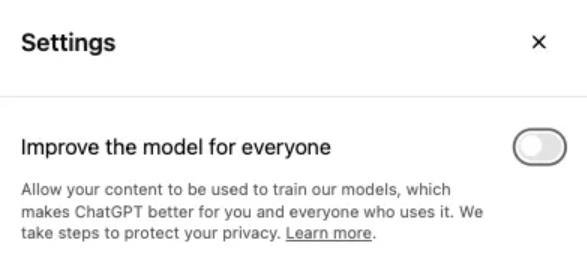
On privacy, check your settings. ChatGPT, for example, lets you turn off “Improve the model for everyone” so your chats aren’t used for training.
A smart trick is to stack free tools: one chatbot for drafting, Perplexity for research, and Canva for visuals. Upgrade only when you hit a real limit.
Should You Use One AI Tool or Several?
Start with one. Learn it well, then add a specialist only when a real need appears. Most people end up with a general chatbot plus one tool for their main craft.
If you like comparing answers, multi-model apps such as Poe put several chatbots in one place. Its App Store listing describes accessing a wide variety of AI models from a single app, and says the app is free to download with in-app purchases. The trade-off is that model availability and limits depend on the providers behind it.
Red Flags: When an AI Tool Isn’t Worth Your Time
Green flags
- A clear, readable privacy policy
- Answers you can verify
- Honest limits on the free plan
- Saves you real time on a real task
Red flags
- No privacy policy, or one you can’t understand
- Promises like “replaces your whole team”
- Confident answers with no way to check them
- Surprise charges or hidden commercial-use limits
Accuracy deserves extra care. Elsevier’s guide to selecting a GenAI tool cites estimates that made-up answers (called hallucinations) range from roughly 3% to as high as 27% depending on the tool. The NIST AI Risk Management Framework also treats reliability and privacy as core concerns. The takeaway: always double-check names, numbers, and quotes.
How Often Should You Re-Check Your AI Tools?
Treat every choice as a draft, not a lifetime commitment. NN/G suggests viewing the result as a provisional decision and revisiting it after a few weeks of real use, or whenever the tool updates.
The monthly check: ask yourself, “Did I use this tool this month, and did it save me time?” If the answer is no twice in a row, cancel it and free up the budget.
Frequently Asked Questions
How do I select an AI tool?
Name one task, score two or three tools on fit, accuracy, privacy, cost, ease of use, and compatibility, then test them on real work. The three steps above walk you through it.
What are the 5 main AI tools?
A common starter set is ChatGPT, Claude, Gemini, Perplexity, and NotebookLM. Together they cover writing, research, Google apps, and studying from your own notes. Our guide to types of AI tools goes deeper.
What is the best AI tool for personal use?
For most people, a general chatbot such as ChatGPT, Claude, or Gemini. Pick the one that gives you the clearest answers on a task you actually do, and keep private details out of it.
What are the top 3 AI tools right now?
There is no official ranking, and the best one depends on your task. ChatGPT, Claude, and Gemini are the most common first picks, but test them on your own work before you decide.
What are 10 widely used AI tools?
ChatGPT, Claude, Gemini, Perplexity, NotebookLM, GitHub Copilot, Midjourney, ElevenLabs, Canva, and Gamma. You do not need all ten. One chatbot, one research tool, and one tool for your main craft is plenty.
Are free AI tools safe to use?
They can be, if you use them carefully. Read the privacy policy, check whether your chats can be used for training, and never enter passwords, bank details, or confidential work files. See ChatGPT’s data controls FAQ for one example of the settings to look for.
Do I need to pay for AI tools?
Not at first. Most major tools have free plans. Upgrade only if you keep hitting a limit that slows down a task you do often.
Final Thoughts
The best AI tool is the one that fits your task, passes a real-world test, and saves you time without adding hassle. Define your need, score a few options, test them on real work, and re-check every so often. Start free, keep it simple, and let your needs choose the tool.