

AI writing tools can draft an email, outline an essay, or turn messy notes into a proposal in minutes, but only if you know what to ask for. This guide shows 15 practical AI writing tools use cases for students, workers, and business owners, with copy-and-paste prompts, a tool-matching table, and clear rules for using AI responsibly.
What you’ll get
15 real AI writing tools use cases, 15 ready-to-use prompts, a task-to-tool table, and a simple checklist for accuracy, plagiarism, and legal questions.
Who it’s for
Students writing essays and study notes, professionals handling daily emails and reports, and business owners producing proposals, documents, and marketing content.
Most people try an AI writing tool once, get a generic answer, and give up. The problem is rarely the tool. It is the task, which is why the best AI writing tools use cases start with a specific job instead of a general question. According to Coursera’s overview of AI writing tools, these tools can support every stage of writing, from brainstorming and outlining to editing and summarizing. If you are brand new to AI, start with our beginner guide to free AI tools and then come back here to put them to work.
What Are AI Writing Tools Use Cases? (Quick Overview)
AI writing tools use cases are specific jobs you hand to an AI writing assistant, such as “summarize this reading,” “reply to this client email,” or “draft a proposal outline.” Instead of asking what the tool can do in general, you start with the task you need finished and work backward to the right prompt and tool.
Under the hood, these tools use generative AI to predict and produce text based on your instructions. If you want to understand why that matters for accuracy, read how AI tools work. The short version: AI is fast and flexible, but it does not know what is true, so you stay responsible for the final result.
Quick rule: Use AI for the heavy lifting (outlines, first drafts, summaries, proofreading) and keep the decisions, facts, and final voice for yourself.
5 AI Writing Tools Use Cases for Students: School and Academic Writing
For students, the safest and most useful role for AI is as a study partner, not a ghostwriter. Always check your school’s or instructor’s AI policy first, because rules vary widely between courses and institutions.

1. Brainstorm essay topics and outlines
Stuck on a blank page? Ask AI for possible thesis statements, angles, and a basic outline. Pick the direction you like, then write the essay yourself. Research from Wharton suggests AI can anchor people on similar ideas, so jot down your own ideas first and use AI to expand them.

2. Summarize research and long readings
Paste a dense article or upload a PDF and ask for a short summary, the main arguments, and open questions. This helps you decide what to read closely. It never replaces reading the source, especially if you plan to cite it.
3. Create study notes and flashcards
Turn lecture notes into flashcards, practice questions, and simple explanations of hard concepts. This is one of the lowest-risk uses of AI because the output is for your own learning, not for submission.
4. Proofread grammar and improve clarity
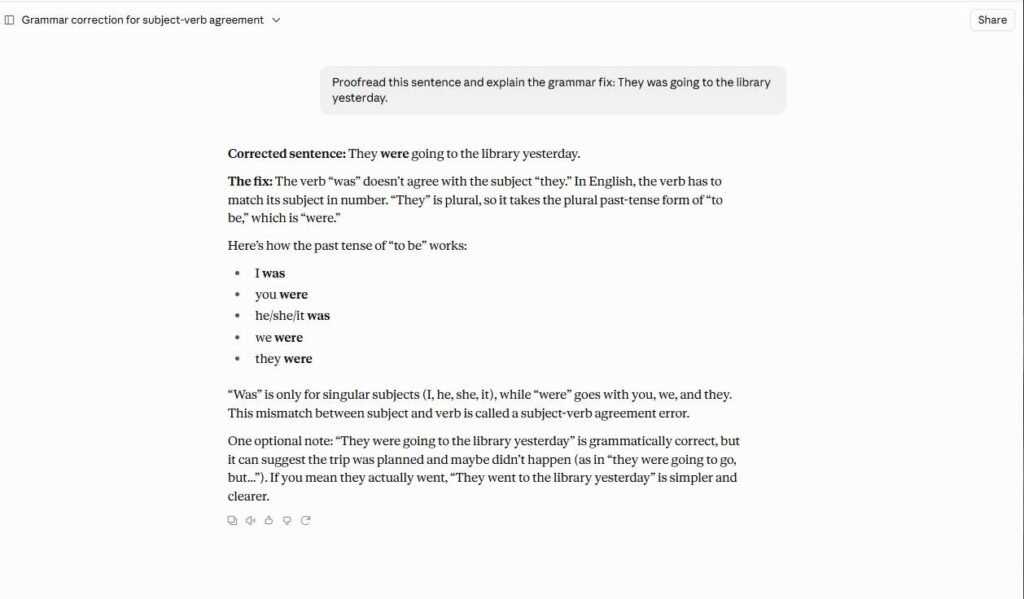
Ask AI to point out grammar mistakes, wordy sentences, and unclear phrasing, and to explain each fix. You learn the pattern, so your next draft improves on its own.
5. Get feedback on your academic writing (without copying)
After you finish a draft, ask AI to act as a teacher and find weak arguments, missing evidence, or confusing structure. Tell it to give suggestions only, not rewrites. You decide what to change, and the ideas stay yours.
5 AI Writing Tools Use Cases at Work to Save Time
At work, the biggest wins come from repetitive writing: replies, summaries, and updates. Gallup research shows AI use at work has been rising steadily, and these five tasks are where most people start. For more time-saving workflows beyond writing, see our guide to AI tools for productivity.

6. Draft and reply to emails faster
Give AI the original email, your goal, and the tone you want. You get a clean first draft in seconds. Always read it for names, dates, and promises before you hit send.
7. Summarize meeting notes
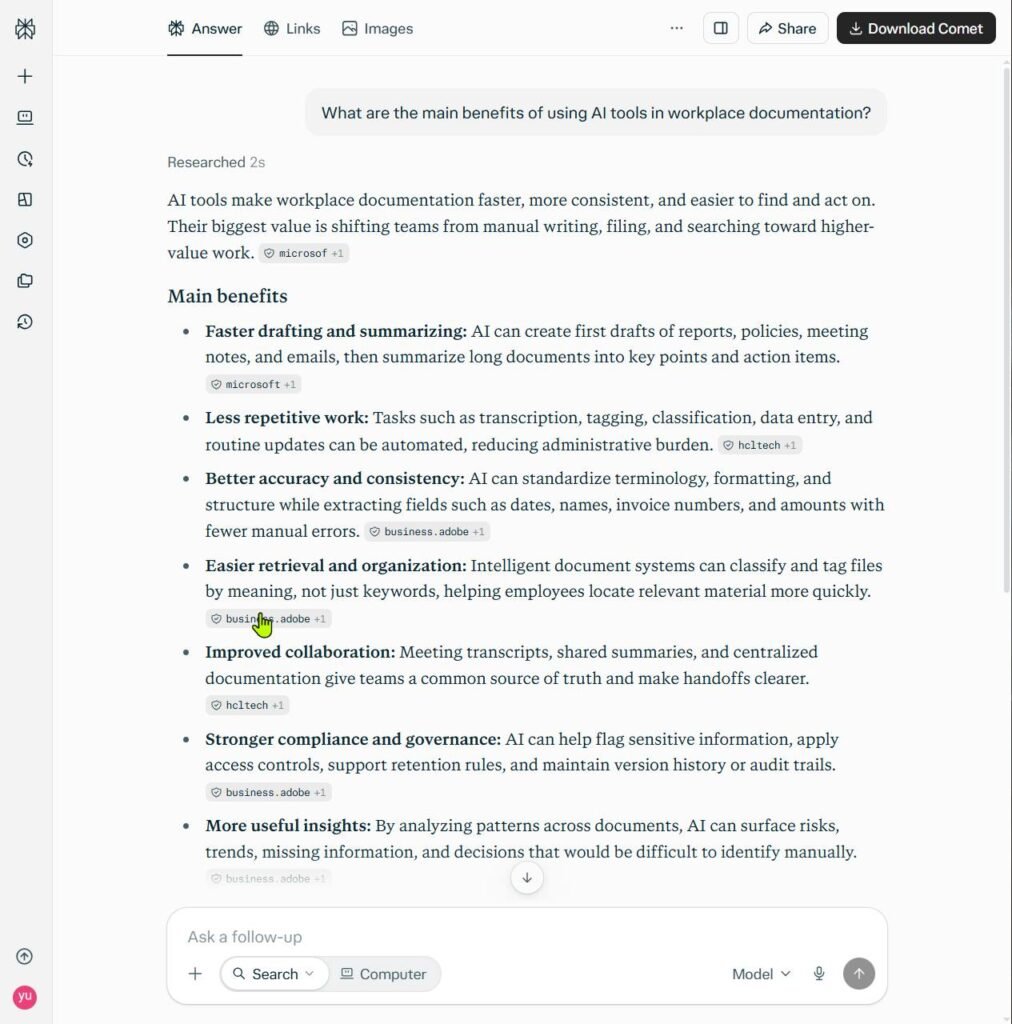
Paste rough notes or a transcript and ask for decisions, action items, owners, and deadlines. It turns a 30-minute cleanup into a 2-minute review.
8. Write reports and project updates
Feed AI your bullet points and ask for a structured update with progress, risks, and next steps for a specific audience. Tailoring it to your reader (a manager, a client, or a team) makes the output far more useful.
9. Create internal documentation and SOPs
Describe a process in plain language and ask for a step-by-step standard operating procedure. Then walk through it yourself or with a teammate to catch missing steps.
10. Turn ideas into presentation outlines
Tell AI your topic, audience, and time limit, and ask for a slide-by-slide outline with talking points. You still design the slides and add your own examples.
5 AI Writing Tools Use Cases for Business Writing and Documents
Business writing has higher stakes: money, contracts, and brand reputation. AI is excellent at producing structured first drafts here, as long as a human reviews everything before it goes out.

11. Write business proposals
Proposals follow a predictable pattern: problem, solution, scope, timeline, and next steps. AI can assemble that structure quickly from your notes. Proposal software company Responsive explains how AI helps with proposal drafting, proofreading, and personalization, while humans still add the details that win deals.
12. Create business documents (policies, plans, and summaries)
Ask AI to list the sections a document needs, then draft each section. This works well for business plans, internal policies, and client summaries. For contracts and anything legal, treat the output as a rough draft and have a qualified professional review it.
13. Generate marketing copy and ads
Give AI your product, audience, main benefit, and tone, then ask for several headline and description options. Pick the best, edit it, and test it. Variety is where AI shines.
14. Plan and write blog and social media content
Use AI to build a content calendar, outline posts, and repurpose one article into several social posts. Add your own experience and examples so the content does not sound generic.
15. Write product descriptions and customer responses
Feed AI your product features and ask for clear, benefit-focused descriptions. You can also draft empathetic replies to customer questions. Keep a human in the loop for refunds, complaints, and anything sensitive.
Copy-and-Paste Prompts for All 15 AI Writing Tools Use Cases
Replace anything in [brackets] with your own details. The more context you give (audience, goal, tone, length), the better the result from any of these AI writing tools use cases. For more ways to improve your prompts, see our tips on how to get the most out of AI tools.
| Use Case | Prompt to Copy |
|---|---|
| 1. Essay topics and outlines | I’m writing a [length] essay on [topic] for [course and level]. Give me 5 possible thesis statements and a basic outline for the strongest one. |
| 2. Summarize readings | Summarize the text below in 150 words. Then list the 3 key arguments and 2 questions I should explore. [paste text] |
| 3. Study notes and flashcards | Turn these notes into 15 flashcards (question and answer) and 5 practice questions. [paste notes] |
| 4. Proofread | Proofread the paragraph below. List each grammar or clarity issue and explain the fix. Do not rewrite the whole paragraph. [paste text] |
| 5. Academic feedback | Act as a [subject] teacher. Review my draft and tell me where the argument is weak, unclear, or unsupported. Give suggestions only, no rewrites. [paste draft] |
| 6. Emails | Write a polite, concise reply to the email below. My goal is to [goal]. Tone: [tone]. [paste email] |
| 7. Meeting notes | Summarize these notes into decisions, action items with owners, and deadlines. [paste notes] |
| 8. Reports and updates | Turn these bullet points into a one-page project update for [audience]. Include progress, risks, and next steps. [paste bullets] |
| 9. SOPs | Create a step-by-step SOP for [process]. Include purpose, who is responsible, tools needed, steps, and common errors. |
| 10. Presentation outlines | Create a 10-slide outline on [topic] for [audience]. Give each slide a title and 3 talking points. |
| 11. Proposals | Draft a proposal for [client] covering the problem, our solution, scope, timeline, and next steps. Use these details: [details] |
| 12. Business documents | List the sections a [policy, plan, or summary] for a [type of business] should have, then draft each one. Flag anything that needs legal review. |
| 13. Marketing copy | Write 5 ad headlines and 2 short descriptions for [product] aimed at [audience]. Focus on [main benefit]. Tone: [tone]. |
| 14. Blog and social content | Create a 4-week content calendar for [business] with one blog topic and three social posts per week. |
| 15. Product descriptions and customer replies | Write an 80-word product description for [product] with these features: [features]. Then draft a friendly reply to this customer message: [message] |
A useful habit: after the first answer, follow up with “make it shorter,” “use simpler words,” or “add a real-world example.” Most good AI output comes from the second or third round, not the first.
Which AI Writing Tool Is Best for Each Use Case?
No single tool wins every task. Use this table to match each of the AI writing tools use cases to a good starting tool, and try the backup if the first does not suit you. If you are still deciding, our framework for choosing the right AI tools walks through the process step by step.
| Task | Best Tool | Why It Fits | Backup Option |
|---|---|---|---|
| Brainstorming and outlines | ChatGPT | Flexible, conversational, and good at many formats | Gemini |
| Long drafts and careful editing | Claude | Handles long documents and nuanced tone well | ChatGPT |
| Research with sources | Perplexity | Gives answers with citations you can check | Gemini |
| Summarizing your own documents | NotebookLM | Answers are based on the sources you upload | Claude |
| Grammar and clarity | Grammarly | Inline corrections while you write | ChatGPT |
| Writing inside Google Docs and Gmail | Gemini | Works directly with Google Workspace | ChatGPT |
| Marketing copy | Jasper | Built for marketing and brand voice | Copy.ai |
| Academic writing polish | Paperpal | Academic language and pre-submission checks | Grammarly |
Want a closer look at the most popular option? Read our ChatGPT review. You can also try Claude, Gemini, Perplexity, and NotebookLM directly, since most offer a free plan with usage limits. For a wider look at tool categories, see types of AI tools explained.
How to Use AI Writing Tools Responsibly (Plagiarism, Accuracy, and Keeping Your Voice)
The Wharton Communication Program puts it well: the goal is to keep ownership of your message and use AI as a thought partner. When you let AI decide what you mean, your writing becomes generic and impersonal.
Accuracy is the other big risk. AI can state false facts with total confidence. A well-known example: consulting firm Deloitte agreed to refund part of its fee to the Australian government after AI errors were found in a report. Always verify numbers, quotes, names, and sources.
Let AI help with
- Structure: outlines, section order, and headings
- Polish: grammar, clarity, and tone checks
- Speed: summaries, first drafts, and rewrites you review
Keep for yourself
- Your argument: what you believe and why it matters
- Fact-checking: numbers, quotes, and citations
- Final voice: the personal stories and examples that make writing yours
Use this quick checklist before you publish or submit anything written with AI help:
- Write your own rough draft first when the message matters, then bring AI in as a second reader.
- Ask for suggestions, not rewrites, so you decide every change.
- Verify every fact and source against a trusted original, and never cite something you have not seen.
- Check for copied or generic phrasing, and rewrite anything that does not sound like you.
- Follow disclosure rules set by your school, employer, client, or publisher.
Over-relying on AI has a hidden cost too. Wharton’s AI team has written about whether AI can deskill people who stop practicing core thinking and writing skills.
Quick tip: Never paste confidential data, client details, or private information into a public AI tool unless your organization has approved it and you understand how the tool handles your data.

Is It Legal to Publish Content Written by AI?
In most places, publishing AI-assisted writing is not illegal by itself. The real questions are who owns it, whether it copies someone else’s work, and whether you are following the rules of the platform or organization where you publish.
On ownership, the U.S. Copyright Office has published guidance on copyright and artificial intelligence. In general, purely AI-generated material without meaningful human authorship may not qualify for copyright protection, while the parts you write, select, and arrange yourself can. Rules differ by country and continue to evolve, so check the current guidance where you live.
Other things to watch: AI can accidentally echo existing text, so run important content through a plagiarism checker. Many publishers, schools, and marketplaces also have their own AI disclosure or content rules, and breaking them can get your work rejected even when no law is involved.
Not legal advice: This section is general information only. If you plan to publish a book, sell AI-assisted content, or use it in contracts, talk to a qualified lawyer in your country.
Common Mistakes to Avoid with AI Writing Tools Use Cases
Most poor results from AI writing tools use cases come from the same handful of habits. Avoid these and your results improve right away.
- Using vague prompts. “Write an email” gets a generic result. Add the audience, goal, tone, and length.
- Copying the first answer. Treat the first output as a draft and refine it with follow-up prompts.
- Skipping fact-checks. AI can invent statistics, quotes, and sources that look real.
- Letting AI replace your thinking. If you cannot explain the argument yourself, you are not ready to submit it.
- Ignoring rules and policies. School, workplace, and publisher rules on AI use differ, and ignorance is rarely accepted as an excuse.
- Sharing sensitive information. Keep private, confidential, and client data out of tools you have not vetted.
FAQs About AI Writing Tools Use Cases
What are good AI writing tool use cases?
Good use cases include brainstorming and outlining, summarizing long text, drafting emails and reports, proofreading, creating study materials, writing proposals, and producing marketing copy. In general, AI works best on structured, repetitive writing tasks that you can review quickly.
What is the best AI for school writing?
For brainstorming and feedback, general assistants like ChatGPT, Claude, and Gemini work well. For grammar and academic polish, Grammarly and Paperpal are popular. For research, tools that show sources, such as Perplexity, make checking easier. Whatever you use, follow your school’s AI policy.
Which AI writing tool is best for business writing?
It depends on the task. General assistants handle emails, reports, and proposals well. Marketing-focused tools like Jasper are built for brand voice and campaigns, and dedicated proposal platforms are built for large, repeatable proposal and RFP response workflows. Our tool selection framework can help you decide.
Which AI is free for writing?
Many popular tools, including ChatGPT, Claude, Gemini, and Perplexity, offer free plans with usage limits, so you can try most AI writing tools use cases at no cost. Free plans can change at any time, so check each tool’s current pricing page before relying on one.
Is it illegal to publish a book written by AI?
Publishing is generally not illegal, but ownership and platform rules are the main concerns. Purely AI-generated text may not get copyright protection, and some retailers and publishers require you to disclose AI use. Check the rules of your platform and consult a lawyer for important projects.
Is using AI for homework considered cheating?
It depends on your instructor and school. Some allow AI for brainstorming or proofreading but not for writing submitted work, while others ban it entirely. Always read the course policy, and when in doubt, ask your instructor before you use it.
Can AI replace human writers?
AI can speed up drafting, but it cannot replace human judgment, original experience, or accountability. As Responsive notes about proposal writing, AI handles the tedious parts while humans make sure the content is correct and tailored to the reader.
Final Thoughts
The best way to use AI writing tools is to start small. Pick one of the AI writing tools use cases from this list, copy the matching prompt, and test it on a real task this week. Review the result, fix what is off, and save the prompts that work. Over time you will build a personal toolkit that saves hours while your writing stays accurate, original, and unmistakably yours.