
Chatbot prompts for job interview practice help you rehearse before the real thing, because your first interview should not be your first practice. This guide gives you 7 copy-and-paste questions, 3 drills to beat the freeze, and a 7-day plan you can start tonight.
Last updated: November 2026. Facts and statistics in this guide link to their original sources, including NACE, the American Medical Association, Duke, UMBC, and the Institute of Student Employers.
You studied for years. Then someone asks, “Tell me about yourself,” and your mind goes blank. That is normal. It also fixes itself with practice.
The problem is finding someone to practice with. Friends are busy. Career centers have waitlists. A free AI chatbot is available at 11 p.m. and never gets tired of asking “why?” Communication is also one of the career readiness competencies defined by NACE (the National Association of Colleges and Employers), the main U.S. group for college hiring. So the reps are worth it, and chatbot prompts for job interview practice are an easy way to get them.
Can a Chatbot Run a Mock Interview? What Fresh Graduates Should Know
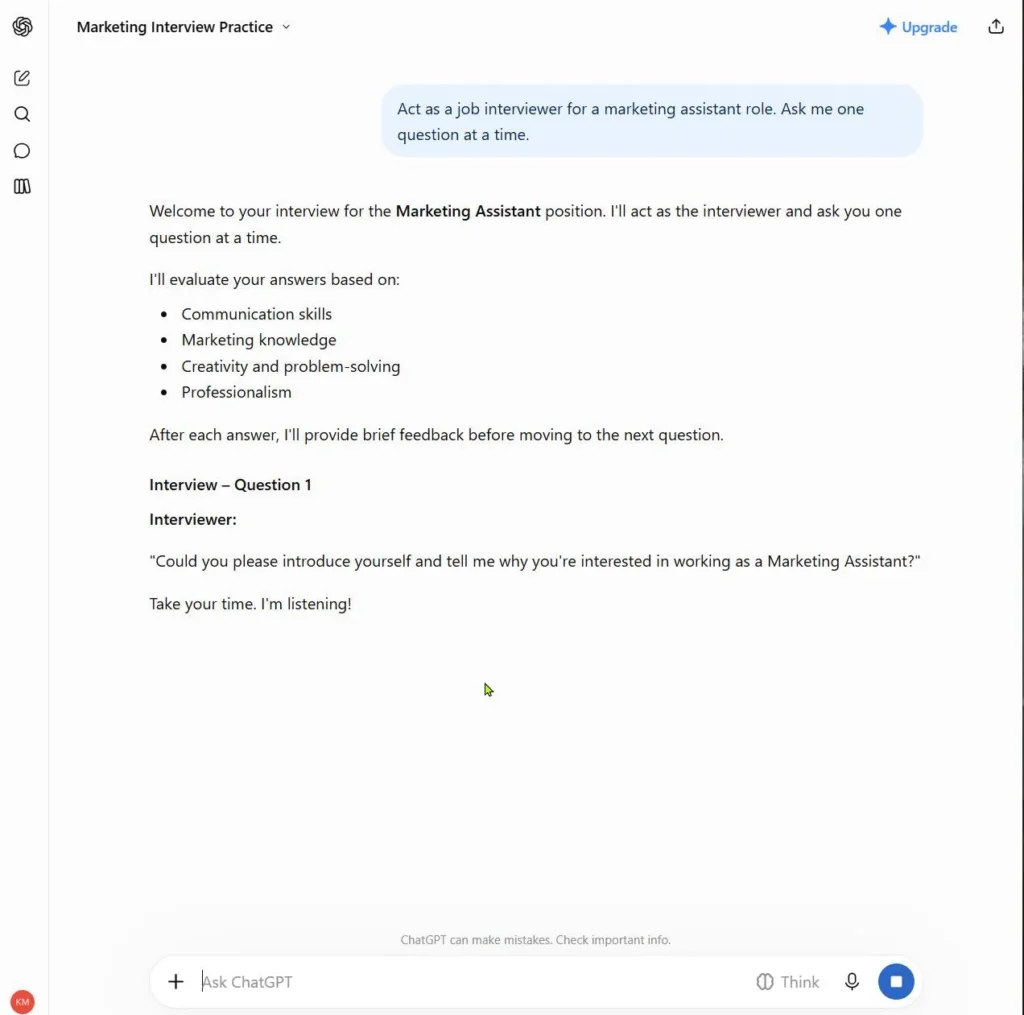
Yes. With the right chatbot prompts for job interview practice, a good AI chatbot can act as your interviewer. It asks a question, waits, reacts to your answer, and gives feedback. The American Medical Association has said the same about interview prep. Its AI strategy lead called mock interviews with AI a high-value, low-risk use of the technology. That article is written for residency applicants, but the logic works for any first job.
Here is what it does well:
- Unlimited reps. Practice at any hour, as many times as you want.
- Follow-up questions. It pushes when your answer is vague.
- Instant feedback. You see what was unclear while it is still fresh.
And here is what it cannot do. It cannot see your eye contact. It cannot hear your nerves unless you use voice mode. And it cannot copy the pressure of a real person watching you. We will cover each gap below.
Which chatbot should you use? Any of the big three works, because all the chatbot prompts for job interview practice here are plain text. If you want help picking, see our guide to ChatGPT vs Claude vs Gemini. New to AI tools overall? Start with AI tools for beginners.
What to Give Your AI Mock Interviewer When You Have No Work Experience
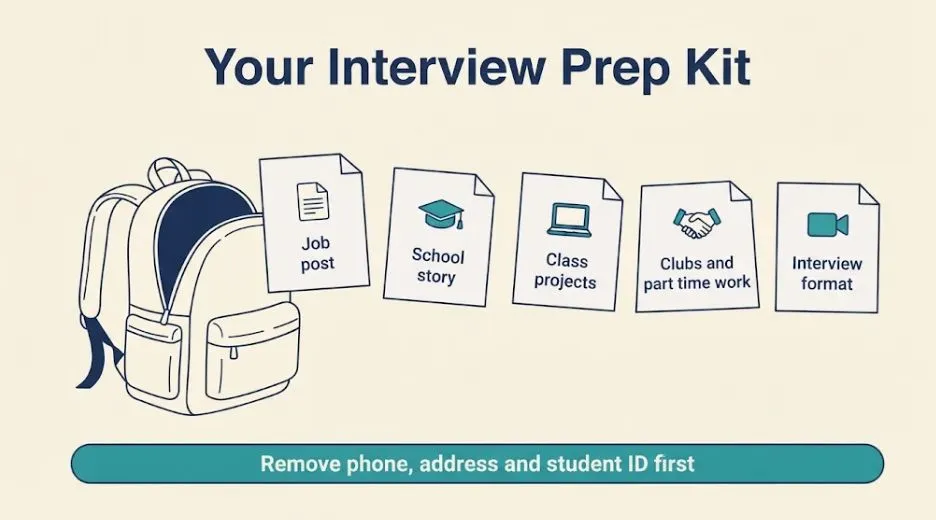
Most guides say, “Paste your resume.” Easy, if you have five years of jobs. You might have a degree and a few projects. That is still enough material. Bring these five things:
- The job post. Paste the full text. It tells the AI what to ask.
- Your school story. Degree, major, and two or three courses that fit the job.
- Your projects. Group projects, a capstone, a thesis, or a class presentation.
- Your other experience. Internships, part-time jobs, volunteering, clubs, or sports teams.
- The interview type. Phone screen, video call, panel, or in person.
Privacy tip: Remove your phone number, home address, and student ID before you paste anything. Never paste private data from an employer or a client.
The 4 Rules Every Mock Interview Prompt Needs
A weak prompt like “interview me” gets you a list of questions and perfect sample answers. That is reading, not practice. Strong chatbot prompts for job interview practice set rules. Use these four every time:
- One question at a time. A pile of ten questions kills the pressure.
- Wait for your answer. Otherwise the chatbot will answer for you.
- Score every answer. Ask for a 1–5 score on relevance, evidence, and clarity. Add one fix.
- No made-up facts. Tell it to use only what you share. AI loves to invent flattering details.
Here is the starter prompt for all the chatbot prompts for job interview practice below. It packs all four rules. Paste it once at the start of each session. Fill in the brackets.
Act as an interviewer for a [job title] role at [company]. I am a recent graduate. Here is the job post: [paste]. Here is my background: [degree, projects, internships, volunteering].
Rules: Ask one question at a time. Wait for my answer. Do not give model answers. After each answer, score me 1–5 for relevance, evidence, and clarity, and give one fix. Use only facts I give you. Never invent experience for me. Ready? Ask question one.
Want more habits like this? Our guide on how to get the most out of AI tools covers how to give clearer instructions.
7 Chatbot Prompts for Job Interview Practice (Copy and Paste)
Paste the starter prompt first. Then use these seven chatbot prompts for job interview practice, one per round. Each one targets a question graduates get asked in almost every first interview.
1. Tell me about yourself
Ask me, “Tell me about yourself.” Then judge my answer. Did I cover my studies, one project, and why this job? Tell me if my answer is too long for 90 seconds when spoken (roughly 200 words).
Use this to build a clean 60–90 second opener. It is the most predictable question, so nail it first.
2. Why do you want this job?
Ask me why I want this job and this company. If my answer could fit any company, say so and ask me for one specific detail from the job post.
Use this to stop giving “I’m passionate about the industry” answers. Specific beats generic.
3. Tell me about a time you worked in a team
Ask me about a time I worked in a team. Push me to say what I personally did, not what “we” did. Ask one follow-up about the result.
Use this with a class group project. Interviewers want to hear your part, not the group’s.
4. Describe a challenge you handled
Ask me to describe a challenge I faced and how I handled it. After I answer, check if I covered the situation, my action, and the result. Ask what I would do differently.
Use this for a tough exam period, a missed deadline, or a difficult teammate. The “what I would change” part shows you can learn.
5. What is your biggest weakness?
Ask me about my biggest weakness. Flag it if my answer is a fake weakness like “I work too hard.” Help me pick a real, small weakness and show what I am doing to improve it.
Use this to practice honesty without sounding unready. Pick a skill you are actively working on.
6. Why should we hire you with so little experience?
Be a tough but fair interviewer. Ask me, “You have limited experience. Why should we hire you?” Then rate how well I connect my projects and skills to the job post.
Use this one to face your biggest fear head-on. A calm answer here lifts your confidence for the rest of the interview.
7. Do you have any questions for us?
Ask me, “Do you have any questions for us?” Then rate the questions I ask. Tell me which ones show I did my homework and which ones I could have found on the website.
Use this to prepare three smart questions. Saying “No, I’m good” is a missed chance.
Chatbot Prompts for Job Interview Practice: 3 Drills to Stop Freezing

Here is the truth about freezing. You will probably blank at least once in a real interview. The goal is not to avoid blanking entirely. The goal is to recover in five seconds instead of sixty. You build that skill with chatbot prompts for job interview practice that train the recovery, not just the answers.
First, memorize three pause lines. Say them out loud:
- “That’s a good question. Give me a moment to think.”
- “Let me think of the best example.”
- “Can I take a few seconds to organize my thoughts?”
Now run these three chatbot prompts for job interview practice as drills.
Drill 1: The silence drill. This trains you to stay calm in a pause.
Ask me a tough question, then wait. When I reply with a pause line like “Give me a moment to think,” tell me if it sounded calm and confident. Then let me give my full answer.
Drill 2: The blank-out recovery. Type “Sorry, I blanked” on purpose, then practice getting back on track.
Ask me a question. I will reply, “Sorry, I blanked.” Respond like a kind interviewer and let me restart. Then coach me to answer in two steps: one sentence with my main point, then one real example.
Drill 3: The pressure ladder. Build up in rounds so the pressure grows slowly.
Run three rounds. Round 1: five easy questions, no time limit. Round 2: five questions, 90 seconds each. Round 3: five questions, 60 seconds each, with a follow-up after every answer. Give me a short summary after each round.
Use a phone timer so the pressure is real. A chat window cannot watch the clock for you.
Turn Class Projects and Internships Into STAR Answers
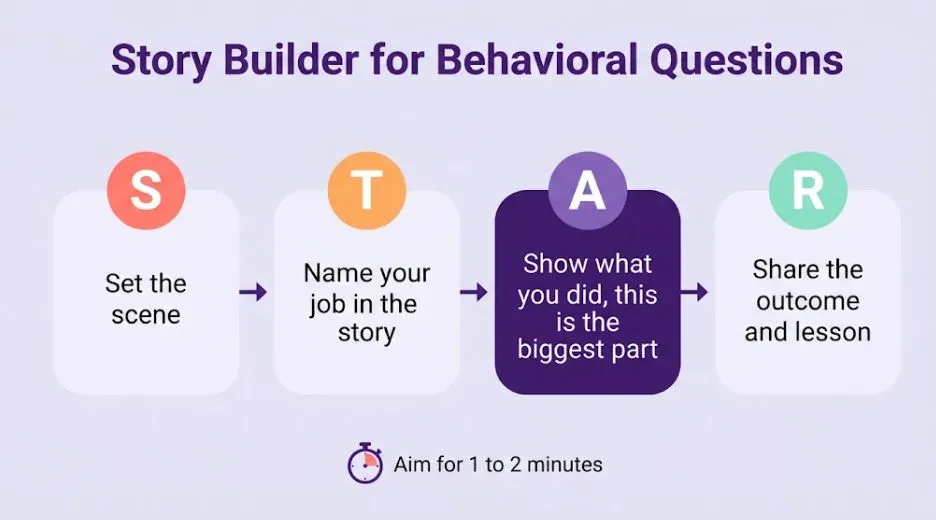
Many interviewers ask, “Tell me about a time when…” These are behavioral questions. The standard way to answer them is the STAR method. Career centers at schools like Duke teach it, and they say a strong STAR answer lasts one to two minutes. STAR stands for:
- Situation: the short background.
- Task: what you had to do.
- Action: what you did. This is the biggest part.
- Result: what happened and what you learned.
You do not need a job to have stories. Good sources for graduates include a group project, a capstone, a club role, a volunteer shift, a part-time job, or an internship. Write rough notes on three of them. Messy is fine. Then use chatbot prompts for job interview practice to shape them into STAR answers.
Turn my rough notes into a STAR answer for the question: [paste question]. Keep Situation and Task short. Spend most of the time on my Action. Use only facts in my notes. If a detail or number is missing, ask me instead of guessing. My notes: [paste notes]
Are your notes messy because they come from long projects? The same trick works for summarizing them. See our AI study chatbot prompts for ways to clean up long notes fast.
Before and After: A Sample Answer, Reviewed by AI
Seeing it work beats reading about it. Below is a sample round of chatbot prompts for job interview practice, using the question “Tell me about a time you worked in a team.” The answers are written as examples to show the process.
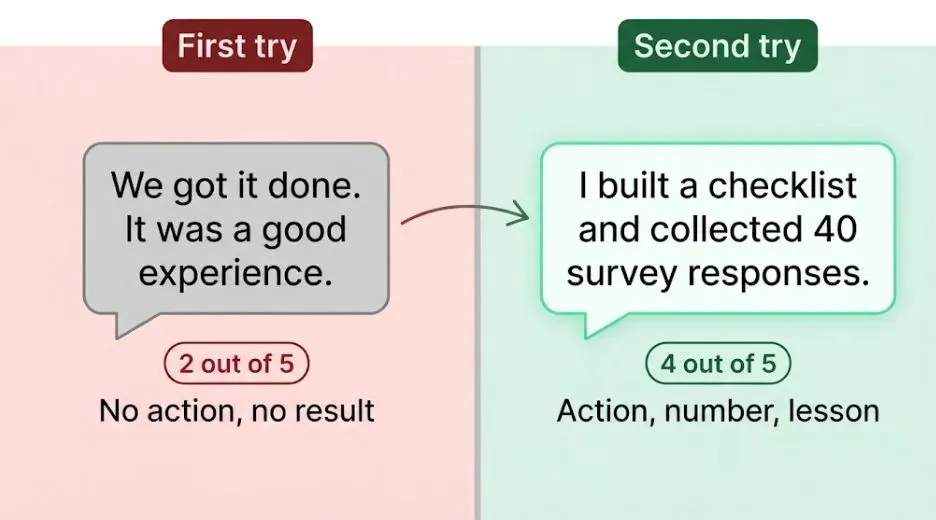
Before (the first try): “I worked in a group for a marketing class. We had a lot of work, but we got it done. I did my part and the team did well. It was a good experience.”
The chatbot’s feedback: “Score: 2 out of 5. Relevance 3, evidence 1, clarity 2. You never say what your part was or how the project ended. Fix: name one action you took and one result.”
After (the second try): “In my marketing class, our team of four had two weeks to build a campaign plan. Two teammates went quiet, so I made a shared checklist and took over the customer survey. I collected 40 responses in three days. We finished on time and earned top marks. Now I set check-in dates on day one.”
See the difference? The second answer has a clear action, a number, and a lesson. It is also short, about 30 seconds when spoken. In a real interview, add a little more detail to your Action to reach one to two minutes.
Be honest: The numbers above are made up for the example. Use only real facts in your answers. An interviewer can ask a follow-up about any detail, and a made-up one falls apart fast.
How to Practice Out Loud With Free Voice Mode
Typing hides the things interviews test: pace, filler words, and how you recover from a blank. Real interviews are spoken. So do at least half of your chatbot prompts for job interview practice by voice. ChatGPT, Gemini, and Copilot all offer voice, and the Claude app has a voice mode as well.
| Chatbot | How to start voice | Official guide |
|---|---|---|
| ChatGPT | Tap the Voice icon in the app or on the website | OpenAI help page |
| Gemini | Use Gemini Live in the mobile app | Google support page |
| Microsoft Copilot | Press the microphone icon | Microsoft support page |
Features and free limits change often, so check the guide for your app. Free plans may cap voice time. If you want to know what a paid plan adds, read our ChatGPT review.
Three habits make voice practice work:
- Paste the starter prompt as text first. Then switch to voice.
- Ask for short questions. Add “Keep each question under two sentences.”
- Time yourself. Aim for one to two minutes per behavioral answer. Record one session on your phone and listen back for filler words like “um” and “like.”
When AI Feedback Is Wrong: Spotting Generic or Too-Nice Scores
Chatbots want to please you. Left alone, a chatbot often hands out 4s and 5s for average answers, even with good chatbot prompts for job interview practice. That feels great and teaches you nothing. Watch for these signs:
Feedback you can trust
- It quotes you: it points to the exact sentence that was weak.
- It is specific: “Add one result” beats “Be more detailed.”
- Scores vary: weak answers get low scores.
Feedback to question
- Everything is “great”: every answer scores 4 or 5.
- It is vague: “Good structure, nice job” with no reason.
- It adds new facts: it rewrites your answer with details you never gave.
If you see these warning signs, paste this fix:
Be a strict interviewer. Do not be nice. Quote the one sentence in my answer that hurt it most. Score honestly, and give a 3 or lower if the answer has no real example.
Also, never trust a chatbot for facts about a company. It may describe an old interview format or outdated news. Check the company’s own website. Our guide on using AI chatbots for research shows how to verify claims fast.
A 7-Day Practice Plan Before Your First Interview
No time to guess what to practice? Follow this plan. Each day uses chatbot prompts for job interview practice and takes about 20 minutes.
| Day | What to practice |
|---|---|
| Day 1 | Paste the job post and your background. Practice “Tell me about yourself” until it takes 60–90 seconds. |
| Day 2 | Prompts 2 and 5: why this job, and your weakness. |
| Day 3 | Write notes for three stories. Turn each into a STAR answer. |
| Day 4 | Prompts 3 and 4: teamwork and a challenge. |
| Day 5 | The three freezing drills. Use a timer. |
| Day 6 | A full mock interview in voice mode. Record it and listen back. |
| Day 7 | Prompts 6 and 7. Then practice once with a real person. |
That last step matters. Many school career centers offer free practice interviews. The UMBC Career Center, for example, strongly recommends booking a one-on-one practice interview with a career specialist. If you are a student or recent graduate, ask your school if you can book one. A friend works too.
What AI Can’t Do (and Why You Shouldn’t Use It in the Real Interview)
Chatbot prompts for job interview practice make AI a sparring partner, not a coach or a cheat sheet. Know its limits:
- It cannot judge delivery. Eye contact, posture, and tone are invisible to it.
- It does not know your interviewer. Real panels may ask very different questions.
- It can invent details. Always check what it writes against your real experience.
Now the big one. Do not use AI to feed you answers during a live interview. Employers are watching for it. In a survey by the UK’s Institute of Student Employers, using AI in interviews without permission was the most commonly reported form of misconduct, cited by 61% of employers in 2025. Reading from a screen also breaks eye contact and makes you sound like a robot. Use AI to prepare. Then walk in and use your own words.

One more thing. Some employers do allow AI in certain steps, like writing applications. When in doubt, check the employer’s rules or ask the recruiter.
FAQ: 30-60-90 rule, “Is an AI interview a red flag?”, and more
Can ChatGPT conduct a mock interview?
Yes. Tell it to act as the interviewer, paste the job post, and set the four rules: one question at a time, wait for your answer, score each answer, and never invent facts. The starter prompt above does all of this, so you can reuse the same chatbot prompts for job interview practice in any app. Other chatbots like Claude, Gemini, and Copilot work the same way.
What is the 30-60-90 rule in an interview?
It is a question about your first three months. The interviewer asks what you would do in your first 30, 60, and 90 days. See this Fortune explainer for the idea. For a graduate, a simple plan works: learn the team and tools in the first 30 days, do small tasks on your own by day 60, and own one task by day 90. You can practice it by asking your chatbot to pose the question and score your plan.
Is an AI interview a red flag?
Not by itself. Many employers use AI tools to scan, rank, or review recorded video answers, as the Institute of Student Employers describes. It is smart to ask what the step measures and whether a person reviews the result. A red flag is an employer who will not explain the process at all.
Can interviewers tell if you are using AI?
Often, yes. Long pauses, stiff wording, and eyes fixed on one spot can all give it away. Some employers end the interview when they suspect it. Do not risk it. Practice with AI, then answer in your own voice.
What are good questions to ask about AI in a job interview?
Try these: “How does the team use AI tools day to day?” “Is there guidance on which AI tools are allowed at work?” and “How do you train new hires to use them well?” They show you are curious and ready for a modern workplace. Our guide on why to use an AI assistant at work gives you real examples to reference.
Is there a free AI for mock interviews?
Yes. The free plans of ChatGPT, Gemini, Copilot, and Claude can all run a text mock interview with chatbot prompts for job interview practice. Limits on messages and voice time differ and change often. Check each app’s current plan page.
What if the AI gives me model answers even after I said not to?
This happens in long chats, because the chatbot forgets your rules. Paste the rules again, or start a fresh chat for each round. Keep each chat to about five questions.
Final Thoughts
Freezing is not a flaw in you. It is a lack of reps. Chatbot prompts for job interview practice give you those reps for $0, at any hour, with no waiting list. Start small tonight. Paste the starter prompt, run prompt 1, and score yourself. Tomorrow, add voice.
The verdict: Use a free AI chatbot as your daily practice partner, and use a real person for your final mock. Do the 7 chatbot prompts for job interview practice, run the 3 freeze drills, and keep every answer honest. Do that for a week and your first interview will feel like your fifth. Want more tools to build skills like this? Browse our AI tools hub.
This guide is for general education, not personal career advice. Read our disclaimer, or learn more about who we are on the About Us page.