
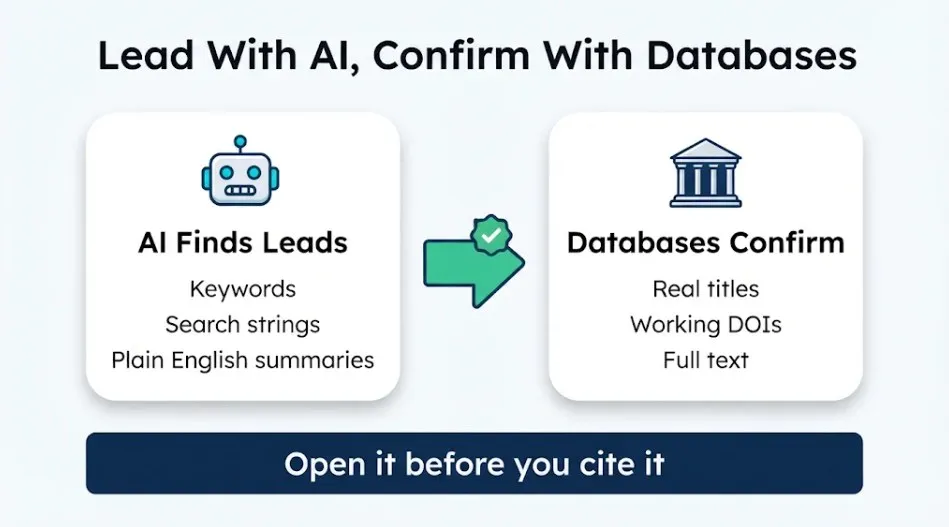
How to use AI chatbots for research starts with one idea: let AI find the leads, and let real databases prove them. You have a paper due, 30 browser tabs open, and still no solid source. Sound familiar? This guide helps you find credible sources in minutes, not hours, and never get burned by a fake citation.
Let’s be honest. Most students don’t struggle with writing. They struggle with finding good sources fast. AI chatbots can help with that, but only if you use them the right way. Used the wrong way, they invent books, journals, and page numbers that look real and are not.
This guide shows you how to use AI chatbots for research in 7 simple ways. You will get copy-and-paste prompts, a 5-step verification check, citation formats, and a full worked example. If you are new to chatbots, start with our explainer on what an AI chatbot is first.
How to Use AI Chatbots for Research: Why Finding Credible Sources Takes So Long
Source hunting eats time for three reasons. You don’t know the right keywords yet. You can’t tell which results are scholarly. And you waste hours on papers you can’t even open.
AI chatbots help with the first problem a lot. They suggest keywords, related terms, and angles you hadn’t thought of. They can also explain a hard paper in plain English so you know if it’s worth reading.
Here is the catch. A chatbot is a language tool, not a library. It predicts text. It does not look up a database unless it has a search feature. A study in Scientific Reports checked citations generated by ChatGPT and found that 55% of GPT-3.5 citations and 18% of GPT-4 citations were fabricated, and many of the real ones contained errors. So the rule for this whole guide is simple:
Golden rule: Use AI to find leads. Use real databases to confirm them. Never cite something you haven’t opened yourself.
Way 1: Check Your School’s AI Policy Before You Start
Do this first. It takes five minutes and can save you from an academic integrity case. Rules differ by university, by department, and even by professor.
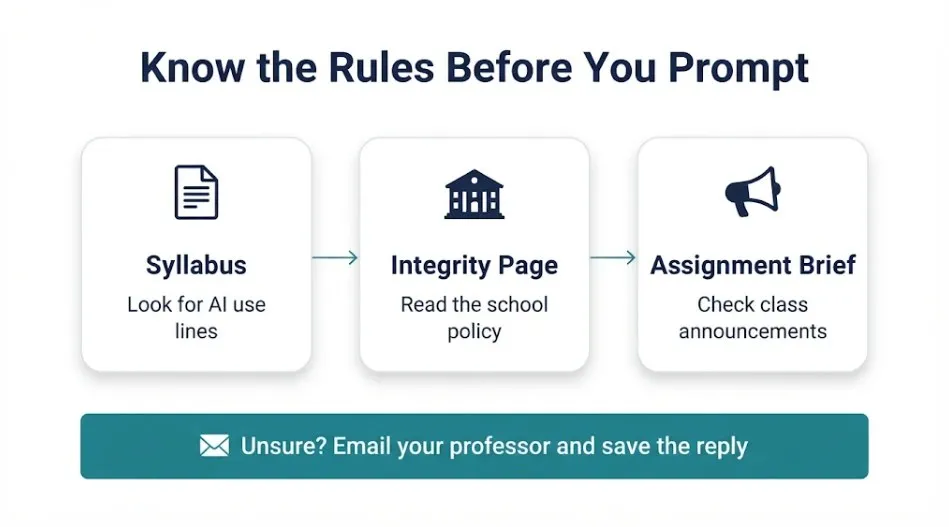
Check these three places:
- Your course syllabus
- Your university’s academic integrity page
- Your assignment brief or learning platform announcements
Many schools allow AI for brainstorming and searching but not for writing the final text. Some ban it completely. If the rules are unclear, email your professor and ask. A written reply protects you.
If your school allows AI use but asks you to be open about it, you can adapt this short disclosure:
AI use disclosure (template): “I used [chatbot name and version] on [date] to brainstorm search keywords and find possible sources for this paper. I located, read, and verified every cited source myself in [database or library name]. I wrote all analysis and text in this paper on my own.”
Way 2: Turn Your Topic Into One Clear Research Question
“Social media and mental health” is a topic. It is too big to search. “How does daily Instagram use affect anxiety in first-year university students?” is a research question. You can actually search that.
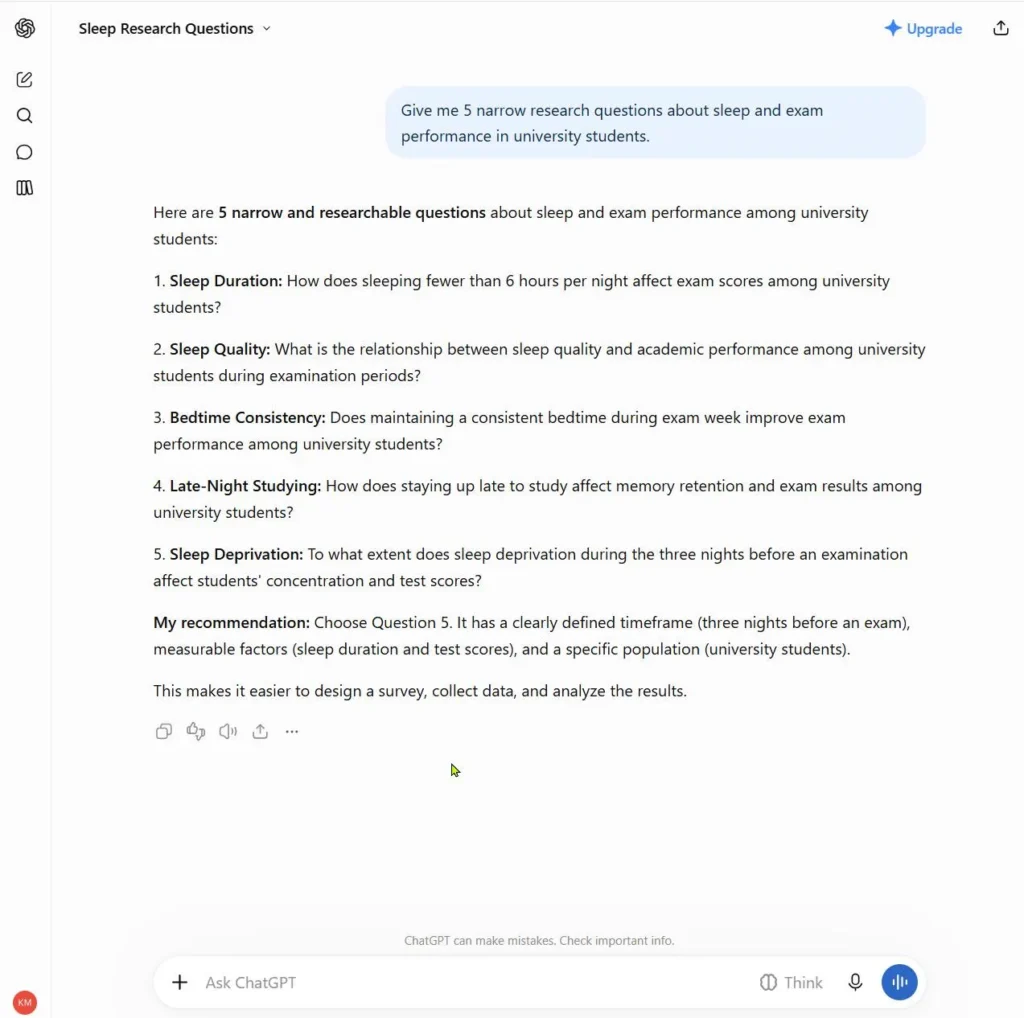
A good research question has four parts: who, what, how, and where or when. This is the first step in how to use AI chatbots for research: let the chatbot help you shape one. Try this:
Prompt: “My topic is [topic] for a [course level] paper. Give me 5 narrow research questions. For each, name the population, the variables, and one keyword set I can use in a library database.”
Pick one question. Write it at the top of your notes. Every source you keep must help answer it. This one habit cuts your reading time fast. For more prompt ideas, see our AI study chatbot prompts.
Way 3: Choose the Right Chatbot (Free vs. Paid Options for Students)
You don’t need to pay to start. Free plans of the big chatbots cover brainstorming, keyword help, and explaining papers. What matters more is whether the tool can search the live web and show its sources.
Here is a quick way to think about it:
| Need | Free plan is usually enough? | Why |
|---|---|---|
| Brainstorm questions and keywords | Yes | Needs no live data |
| Explain a hard paper you uploaded | Often | Free plans may limit file size or daily use |
| Search the web with linked sources | Often | Check the limits on your plan |
| Deep, multi-source research reports | Sometimes paid | Longer research modes often have tighter free limits |
| Heavy daily use during exam season | Often paid | Higher message limits |
Plans and limits change often, so check the official pages before you pay for anything. Start with ChatGPT’s pricing page, Anthropic’s pricing page for Claude, and Google Gemini. Many universities and Google or Microsoft education programs also offer discounts or free access to students, so ask your IT desk first.
Not sure which one fits you? Our ChatGPT vs Claude vs Gemini comparison breaks it down.
Way 4: Use Copy-and-Paste Prompts to Find Sources for Your Research Paper
Here is how to use AI chatbots for research step by step. One big prompt gives you a messy answer. A chain of small prompts gives you a clean source plan. Run these in order in the same chat. Replace the brackets with your own details.
Prompt 1: Map the topic.
“My research question is: [question]. List the 8 key concepts, 10 search keywords, and 5 synonyms I should use in Google Scholar and my library database.”
Prompt 2: Build search strings.
“Turn those keywords into 3 Boolean search strings using AND, OR, and quotation marks. Make one broad, one narrow, and one that targets review articles.”
Prompt 3: Get source types, not fake titles.
“What types of sources would best answer my question (for example systematic reviews, government data, or longitudinal studies)? Do not invent specific titles, authors, or DOIs. Tell me which databases to search.”
Prompt 4: Understand a paper you found. Paste the abstract or upload the PDF.
“Summarize this in plain English: the question, method, sample size, main finding, and limits. Quote the exact sentence for each claim so I can check it.”
Prompt 5: Spot the gaps.
“Based on these 5 abstracts, what do they agree on, where do they disagree, and what is missing? Only use what I pasted.”
See the pattern? Prompt 3 says “do not invent”. That line matters. You are asking the chatbot to guide your search, not to hand you a bibliography. Want to sharpen your prompting overall? Read how to get the most out of AI tools.
Way 5: Use AI Source Finders Like Perplexity, Consensus, and Semantic Scholar
General chatbots are good thinking partners. Source finders are built to point you to real documents. Use both.
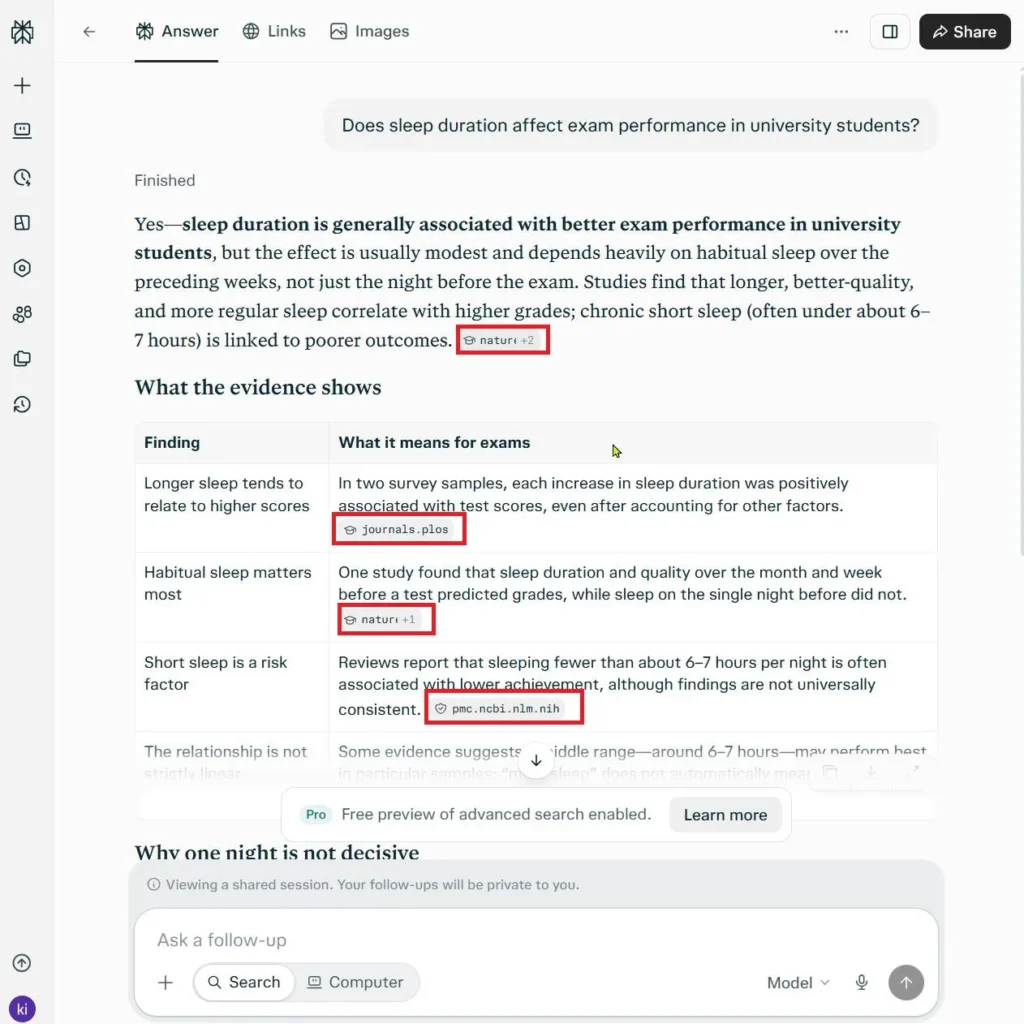
Perplexity answers with numbered links to web pages. Use it to get a quick overview and a list of leads. Always click the links. It can still misread a page.
Consensus searches peer-reviewed research and shows what studies say on a yes/no style question. Use it when your question is something like “Does sleep affect exam performance?”
Semantic Scholar is a free academic search engine from the Allen Institute for AI. It shows citation counts, related papers, and short summaries. Use it to follow the trail from one good paper to its neighbors.
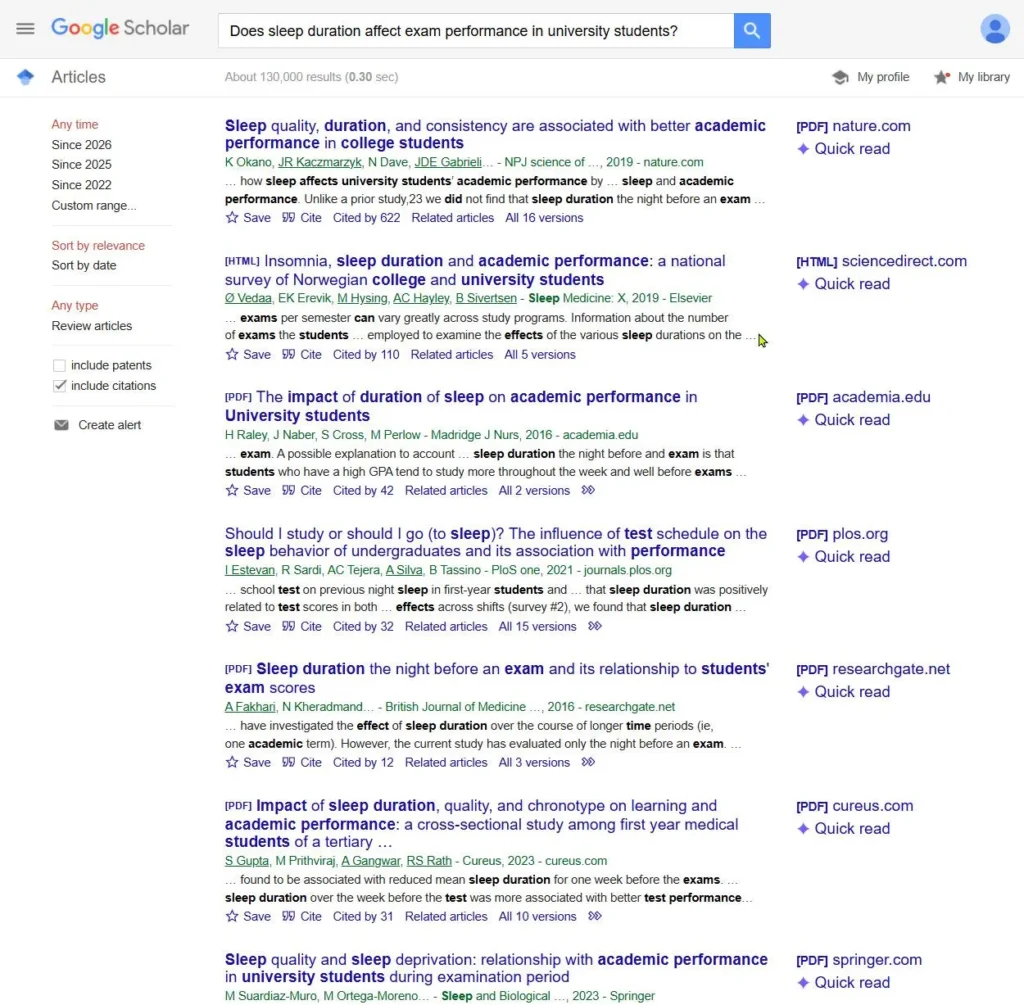
Don’t forget the classics. Google Scholar and your university library database are still the best places to confirm a paper exists. A smart combo: find leads with AI, then search the exact title in Scholar or your library.
Way 6: Verify Every Source in 5 Steps (Catch Fake Citations Fast)
This is the step that saves your grade. AI-made citations often look perfect. The author names may be real. The journal may be real. The paper may not exist. Run every source through this check:
- Search the exact title. Paste it in quotation marks into Google Scholar or your library search. No match? Be suspicious.
- Test the DOI. Add it after
https://doi.org/. If it goes to a different paper or nowhere, the citation is wrong. You can also look it up on Crossref. - Check the journal. Visit the journal’s site. Does that volume, issue, and page range exist?
- Match the author. Search the author’s name. Do they work in this field and have this paper listed?
- Open it and find the claim. Read the abstract at least. Does the paper really say what the chatbot said it says?
Step 5 is the one students skip. A source can be real and still not support your point. Also check whether a paper was withdrawn using the Retraction Watch Database.
Fast red flag: If a chatbot gives you a perfect-looking reference with no link, and you can’t find it in two searches, drop it. Don’t “fix” it. Find a real source instead.
Way 7: Judge Credibility and Cite Sources in APA or MLA
A real source is not always a good source. Use the CRAAP test, a method many university libraries teach. Here is a version you can use in a minute, based on the California State University, Chico library guide:
- Currency: Is it recent enough for your topic?
- Relevance: Does it answer your research question?
- Authority: Who wrote it? What are their credentials?
- Accuracy: Is it peer reviewed? Does it cite its own evidence?
- Purpose: Is it to inform, sell, or persuade?
Peer-reviewed journal articles, government reports, and university press books sit at the top. Anonymous blogs and AI-written pages sit at the bottom.
Now cite. Build your citation from the real source you opened, never from the chatbot’s text. Here is the basic journal article pattern in both styles (see the official APA Style site and the MLA Style Center for full rules):
| Style | Journal article format |
|---|---|
| APA 7 | Author, A. A., & Author, B. B. (Year). Title of article in sentence case. Journal Name in Title Case, Volume(Issue), pages. https://doi.org/xxxx |
| MLA 9 | Author Last, First, and First Last. “Title of Article in Title Case.” Journal Name, vol. #, no. #, Year, pp. #-#. DOI or URL. |
If you must cite the chatbot itself, for example because you quote its output, follow the official rules: APA’s guide to citing ChatGPT and MLA’s guidance on citing generative AI. Rules for AI citations are still evolving, so check the latest version or your professor’s preference.
Worked Example: From Research Question to Verified Source List in 15 Minutes
Let’s see how to use AI chatbots for research from start to finish. This is an illustrative example. The topic is real, but follow the steps with your own question and your own results.
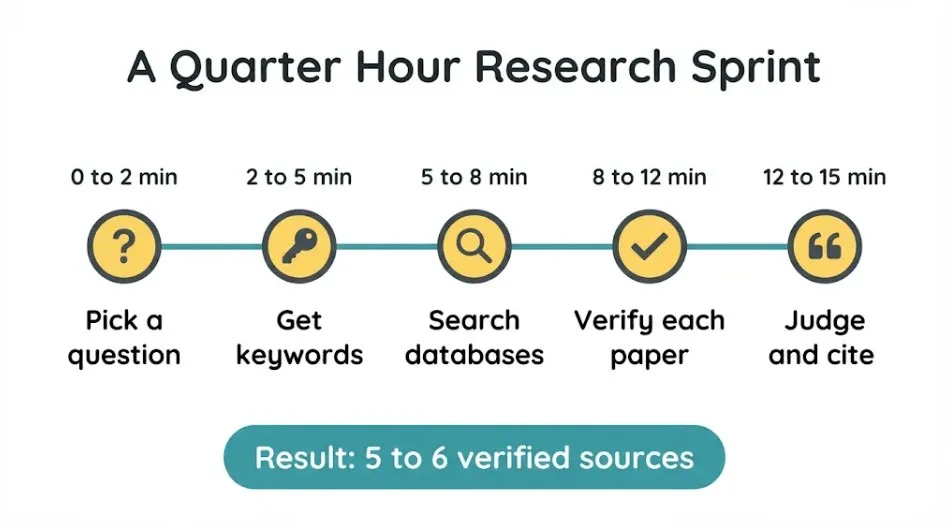
Minutes 0-2: Question. You start with the topic “sleep and grades.” You use the Way 2 prompt and pick: “How does sleep duration affect exam performance in university students?”
Minutes 2-5: Keywords. You run Prompts 1 and 2. You get terms like “sleep duration,” “academic performance,” “undergraduate,” and a search string such as: ("sleep duration" OR "sleep deprivation") AND ("academic performance" OR "exam scores") AND (undergraduate OR "university students").
Minutes 5-8: Search. You paste the string into Google Scholar and your library database. You also ask Consensus your question to see the overall direction of the research. You save 8 to 10 promising titles.
Minutes 8-12: Verify. For each saved paper you run the 5-step check. Two papers have no full text in your library, so you set them aside. One has a retraction notice, so you drop it.
Minutes 12-15: Judge and cite. You score the survivors with the CRAAP test, keep the best 5 to 6, and paste Prompt 4 for each abstract to get a plain-English summary. Then you build the citations from the real article pages.
Result: a short, verified source list, each with a one-line note on how it helps your paper. Fifteen minutes. No fake references.
Common Mistakes to Avoid When Using AI Chatbots for Research
Asking for “five sources on X” and trusting the list. This is the number one cause of fake citations. Ask for search strategies instead.
Citing a summary instead of the paper. Chatbot summaries can drop details or twist them. Cite what you read, not what the bot said about it.
Skipping the policy check. Even “allowed” use can need a disclosure. Go back to Way 1 if you’re unsure.
Using one tool for everything. A chatbot, a source finder, and a library database each do a different job. Mix them. If you want to compare tool quality yourself, our guide on how to test AI writing tools shows a simple method.
Pasting private or unpublished work into a chatbot. Check the tool’s data settings and your school’s rules before you upload anything sensitive.
Copying AI text into your paper. Besides the policy risk, it weakens your own argument. For why, see AI writing vs human writing.
What to Do When a Source Is Behind a Paywall
You found the perfect paper. Then you hit a “$40 to read” button. Don’t pay yet. Try these in order:
- Use your library. Search the title through your university library. Most universities give students free access to many journals through the library.
- Look for a legal free copy. Try Unpaywall, CORE, or the Open Access Button. They find authorized open versions.
- Search for a preprint or author copy. Authors often post accepted versions on their university page or repository.
- Request it through interlibrary loan. Your librarian can often get you the article in a few days.
- Email the author. Many researchers are happy to share their work.
Need open-access journals from scratch? Browse the Directory of Open Access Journals. And remember: if you can only see an abstract, say so in your notes and don’t make claims the abstract can’t support.
FAQ: How to Use AI Chatbots for Research Papers
Can I use AI chatbots for research papers?
Often yes, but it depends on your school and your professor. Many allow AI for brainstorming and search help but not for writing. Check your syllabus and academic integrity policy first, and disclose your use if required.
Can ChatGPT find real academic sources?
It can point you to useful search terms and databases. But it can also invent references that look real. Treat any source it names as a lead, then confirm it in Google Scholar or your library. Our ChatGPT review covers its strengths and limits.
What is the best AI chatbot for research?
There is no single winner. Chatbots like ChatGPT, Claude, and Gemini are strong for brainstorming and explaining papers. Perplexity, Consensus, and Semantic Scholar are better at finding sources. Mix one of each.
How do I know if an AI citation is fake?
Search the exact title, test the DOI at doi.org, check the journal’s volume and page range, and look up the author. If you can’t find it after two searches, treat it as fake and drop it.
Can I upload a PDF to a chatbot and ask questions about it?
Yes, most major chatbots let you upload a PDF and ask for a summary or key findings. Ask for exact quotes so you can check each claim. Check file limits on your plan, and don’t upload anything you’re not allowed to share.
Are Reddit recommendations a good way to pick AI research tools?
Reddit threads can give you tool ideas, but opinions there are unverified and change fast. Test any tool yourself and check it against your library results before you rely on it.
Should I cite the AI chatbot in my paper?
Cite the real sources you read. If you quote or closely use the chatbot’s own output, cite it using your style guide’s rules, such as APA or MLA, and follow your school’s disclosure rules.
Final Thoughts: The Verdict
Verdict: AI chatbots are great research assistants and terrible librarians. Use them to shape your question, build search strings, and understand tough papers. Use real databases to find and confirm every source. Do that, and you know how to use AI chatbots for research the safe way: you cut hours from your search without risking a fake citation.
Your next move: pick one research question today and practice how to use AI chatbots for research by running Prompts 1 to 3. Then verify your first three sources with the 5-step check. Want more tools to speed up your studies? Explore our AI tools hub and learn hub. New to all this? Start with AI tools for beginners.
Last updated: November 2026. This article is for general guidance. Always follow your own school’s rules. See our disclaimer for details.